If you have $250 a day to spend on ads and you want to reach customers across Google, Meta, and TikTok, the worst thing you can do is split it evenly. The second worst thing is put it all in one place.
The right approach? Allocate based on intent, audience, and platform strengths — then adjust based on data.
This guide walks you through exactly how to split $250/day across three platforms, what to expect in your first month, and when to reallocate.
Why These Three Platforms?
Before we get into the numbers, here’s why Google + Meta + TikTok is the best starting trio for most businesses:
- Google Ads captures people who are already searching for what you sell. This is the highest-intent traffic you can buy.
- Meta Ads (Facebook + Instagram) lets you target people based on interests, behaviors, and lookalike audiences — ideal for discovery and retargeting.
- TikTok Ads reaches younger demographics with video-first content that can go semi-viral even as paid ads.
Together, they cover the full funnel: awareness → consideration → purchase.
If you’re interested in expanding beyond these three, AdPlus supports 12 ad networks including LinkedIn, Amazon, Pinterest, Reddit, Snapchat, and Spotify. But for your first $250/day, three platforms is the sweet spot.
Related: Why We Built AdPlus: One Dashboard for Every Ad Network — the pain of managing multiple platforms is exactly why we built a single dashboard for all of them.
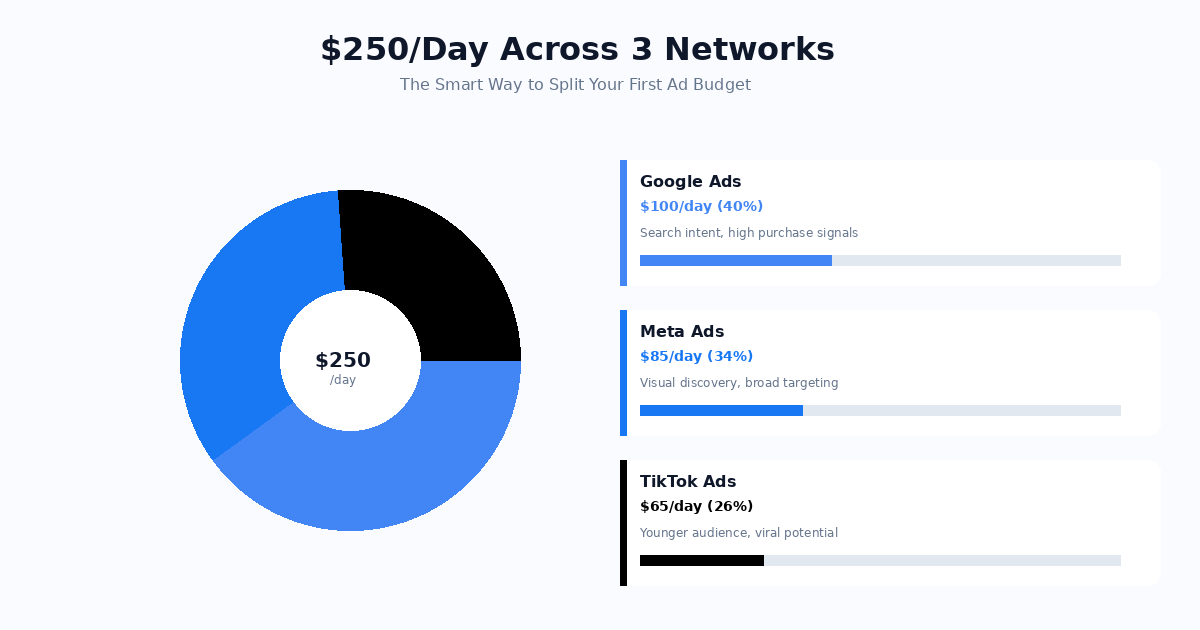
The Split: $100 / $85 / $65
Here’s our recommended starting allocation:
| Platform | Daily Budget | Share | Why |
|---|---|---|---|
| Google Ads | $100 | 40% | Highest intent — people searching for your product |
| Meta Ads | $85 | 34% | Best targeting + retargeting, visual storytelling |
| TikTok Ads | $65 | 26% | Lowest CPM, youngest audience, viral potential |
This isn’t a guess. It’s based on typical conversion rates and CPCs across industries. Google gets the most because search intent converts best. Meta gets strong allocation for its unmatched targeting. TikTok gets the minimum viable budget to test and learn.
Google Ads: Your $100/Day
Google Ads is your workhorse. With $100/day, here’s how to set it up:
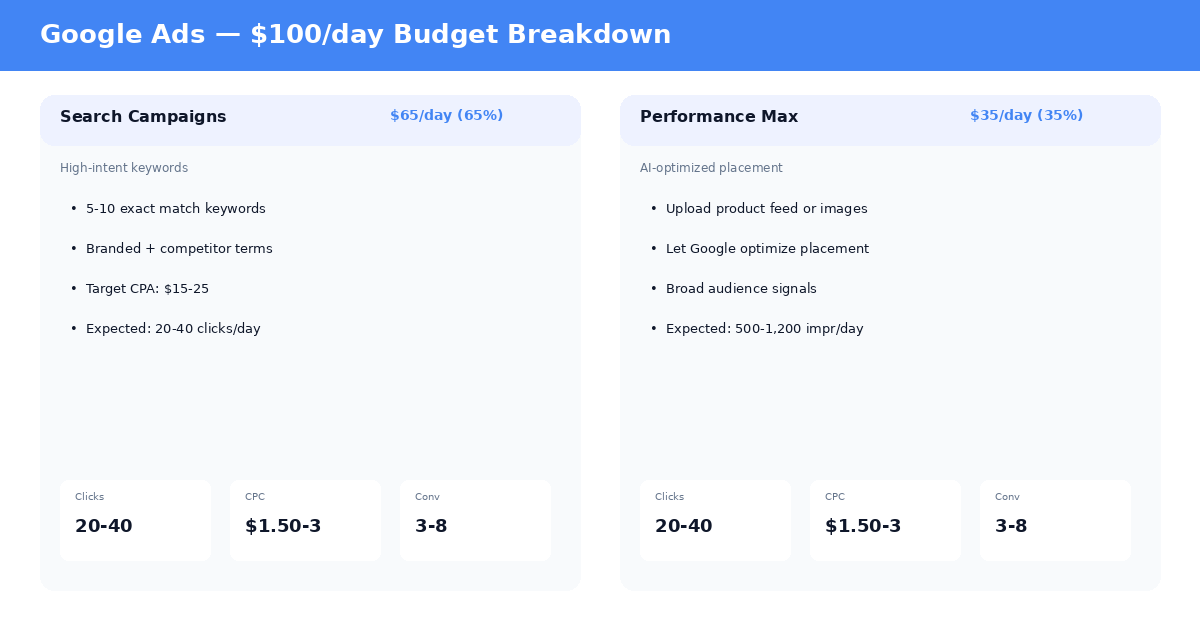
Search Campaigns ($65/day)
This is where most of your conversions will come from.
- Start with 5-10 exact match keywords related to your product or service
- Include branded keywords (your company name) — they’re cheap and high-converting
- Set a target CPA based on what a customer is worth to you. For most small businesses, $15-30 per lead is a good starting range
- Expected results: 20-40 clicks/day at $1.50-3.00 per click
Pro tip: Use AdPlus’s AI planner to generate keyword suggestions based on your business description. It knows which keywords convert for your industry.
Performance Max ($35/day)
Performance Max campaigns use Google’s AI to distribute your ads across Search, Display, YouTube, Gmail, and Maps.
- Upload your best images and product info — Google’s algorithm does the rest
- This is your brand awareness play on Google — it reaches people who haven’t searched yet
- Expected results: 500-1,200 impressions/day, 15-30 clicks, lower intent but wider reach
Meta Ads: Your $85/Day
Meta is where you build audiences and retarget visitors. With $85/day:
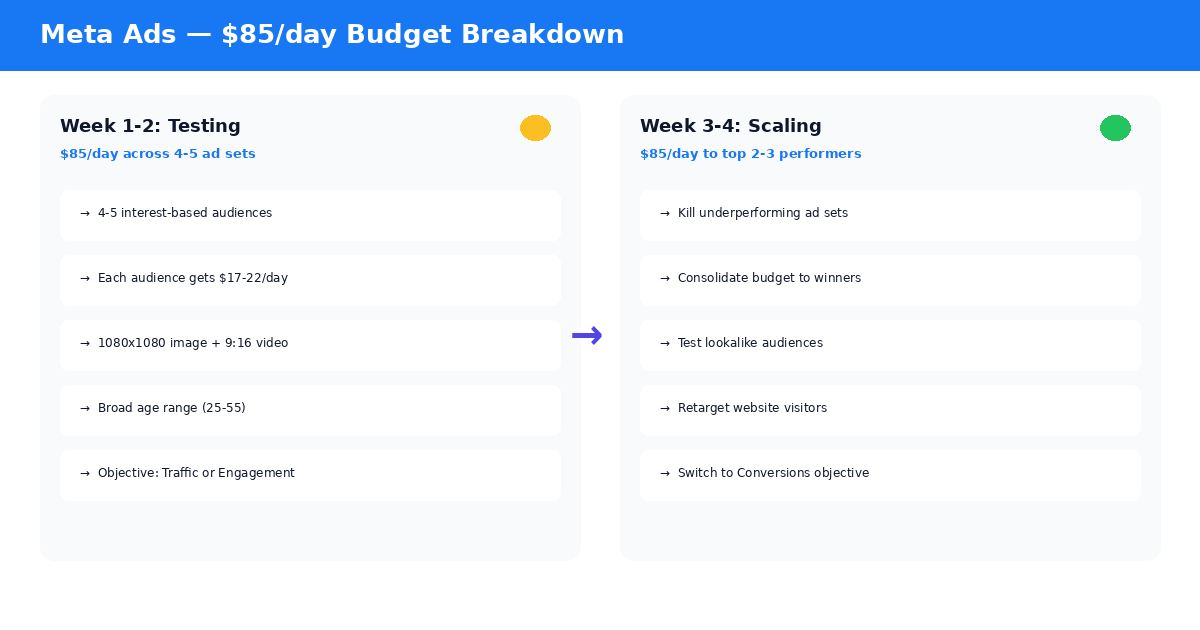
Week 1-2: Testing Phase
- Create 3-4 ad sets, each targeting a different interest-based audience
- Give each ad set $17-22/day — enough for the algorithm to learn
- Use both image (1080x1080) and video (9:16) creatives
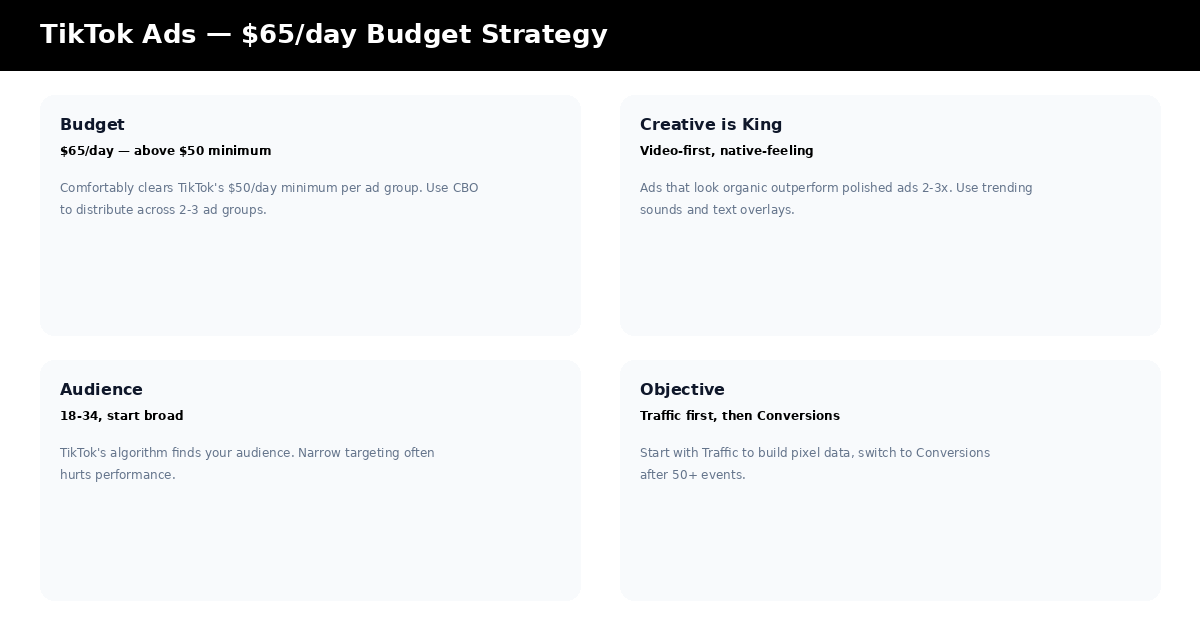
- Start with the Traffic objective to build pixel data
- Check daily: pause any ad set with 0% CTR after 500 impressions
Week 3-4: Scaling Phase
- Kill the bottom 1-2 ad sets — redirect that budget to the winners
- Test lookalike audiences based on your website visitors
- Switch to the Conversions objective once your pixel has 50+ events
- Launch a retargeting ad set targeting people who visited your site but didn’t convert
The key insight: Meta’s algorithm needs data to optimize. Don’t spread $85 across 10 ad sets — focus on 4-5 and let each one accumulate enough data to learn.
TikTok Ads: Your $65/Day
TikTok is your testing ground and awareness engine.
Budget Setup
TikTok requires a $50/day minimum per ad group. With $65/day, you comfortably clear that. Here’s how to set it up:
- Use Campaign Budget Optimization (CBO) — set the budget at the campaign level, not the ad group level
- Create 2-3 ad groups under one campaign — TikTok distributes the budget automatically
- Each ad group targets a different audience — one broad, one interest-based, one lookalike (if available)
Creative Strategy
TikTok ads that look like organic content outperform polished ads by 2-3x. Here’s what works:
- Use trending sounds — check TikTok’s Creative Center for what’s popular
- Fast cuts in the first 2 seconds — you have less time to hook someone than any other platform
- Text overlays — many people watch with sound off
- Native-feeling content — shoot on a phone, not a studio
What to Expect
- CPMs of $3-8 (much lower than Meta’s $10-15)
- CTR of 1-2% (lower intent, but cheaper reach)
- Best for: Brand awareness, email list building, product discovery
Your 4-Week Roadmap
Don’t just set it and forget it. Here’s what to do each week:
Tired of juggling 12 ad network dashboards?
AdPlus plans, launches, and monitors campaigns across Google, Meta, LinkedIn, TikTok, and 8 more networks — from one chat. Free Starter tier, no credit card.
Get started →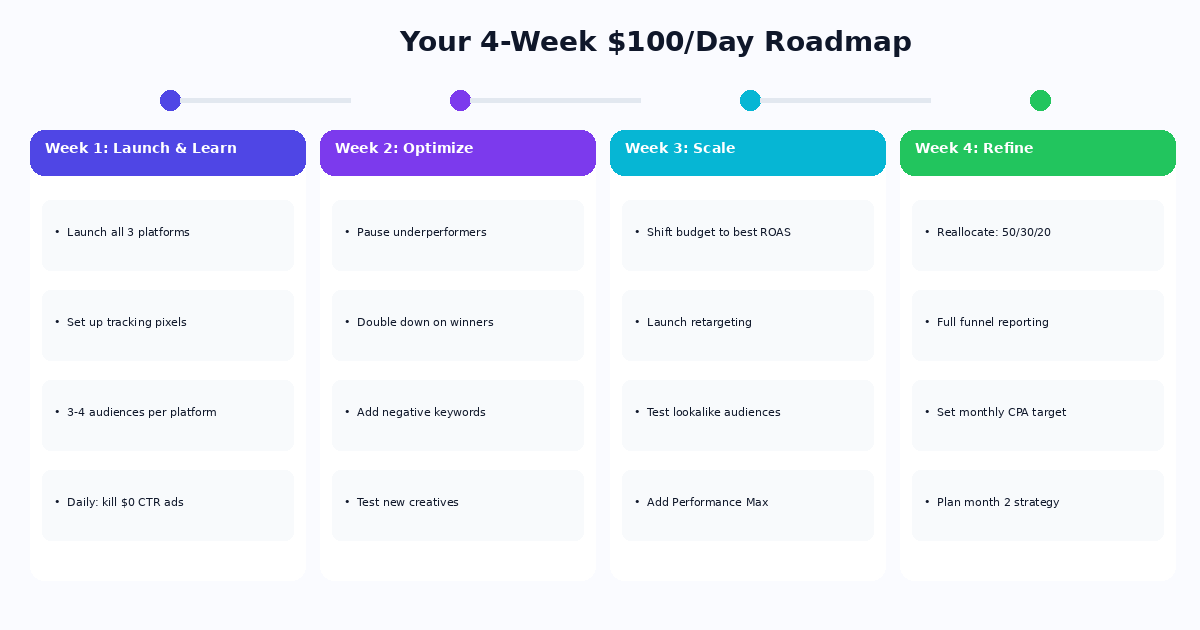
Week 1: Launch & Learn
- Launch all three platforms simultaneously
- Set up conversion tracking pixels on all three (Google Tag, Meta Pixel, TikTok Pixel)
- Create 3-4 audience variations per platform
- Daily task: check for ads with zero engagement and pause them
Week 2: Optimize
- Pause underperforming ad sets / ad groups
- Double the budget on your best-performing audiences
- Add negative keywords on Google (filter out irrelevant searches)
- Test new creatives on Meta (the first batch rarely wins)
Week 3: Scale Winners
- Shift budget toward the platform with the best ROAS
- Launch retargeting on Meta (your secret weapon)
- Test lookalike audiences on Meta and TikTok
- Add a Performance Max campaign on Google
Week 4: Refine & Plan
- Your data now tells you where to invest next month
- Typical reallocations after one month of data:
- If Google converts best: Move to $125/$75/$50
- If Meta converts best: Move to $75/$110/$65
- If TikTok surprises you: Move to $65/$85/$100
- Set a monthly CPA target based on actual results
- Plan your Month 2 strategy
Which Platform Should Get More?
Not sure where to put the extra dollars? Use this framework:
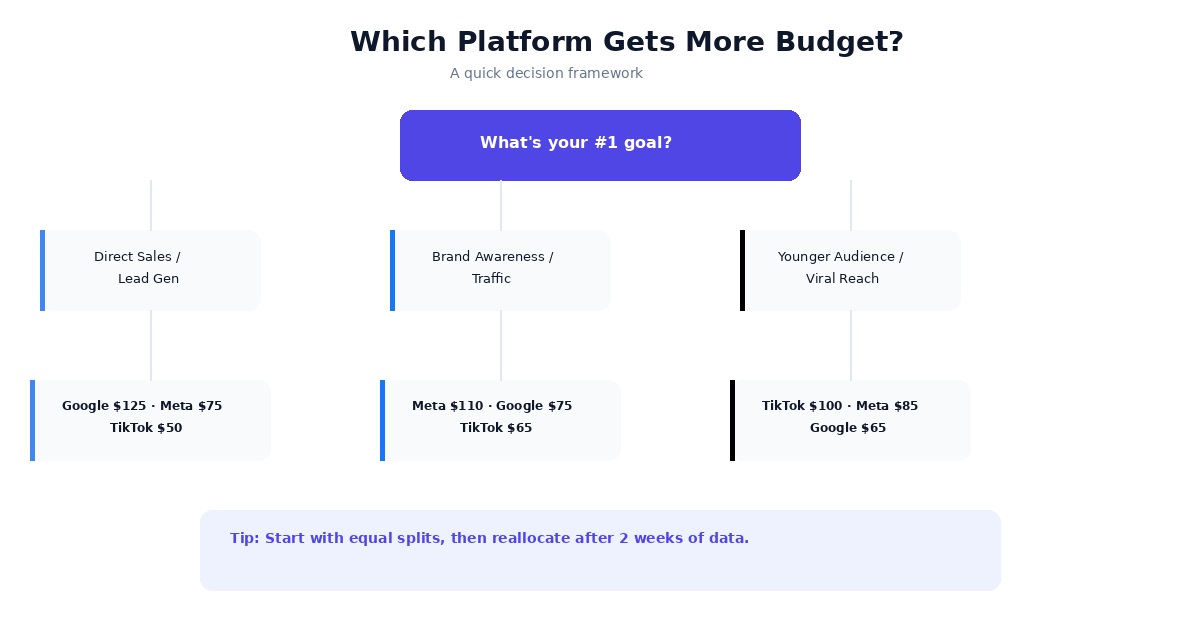
If your goal is direct sales or lead gen: Weight toward Google (50% Google, 35% Meta, 15% TikTok). Search intent converts.
If your goal is brand awareness: Weight toward Meta (30% Google, 45% Meta, 25% TikTok). Meta’s targeting is unmatched for building audiences.
If your audience skews young (18-34): Weight toward TikTok (20% Google, 40% Meta, 40% TikTok). The CPMs are too good to ignore.
If you’re in e-commerce: Consider replacing TikTok’s slot with Amazon Ads. AdPlus supports Amazon with Sponsored Products and Sponsored Brands.
Common Mistakes to Avoid
1. Splitting budget equally across platforms. $83/$83/$83 means no platform gets enough data to optimize. The algorithms need concentrated spend.
2. Giving up after one week. Ad platforms need 7-14 days of data before their optimization kicks in. Week 1 results are not representative.
3. Running the same creative everywhere. What works on Google (text-heavy, keyword-focused) doesn’t work on TikTok (native video, trend-driven). Tailor your creatives per platform.
4. Ignoring conversion tracking. Without pixels, you’re flying blind. Set up tracking before you launch. AdPlus sets up conversion tracking guidance as part of the campaign planning process.
5. Not retargeting. Someone who visited your site and didn’t buy is 10x more likely to convert than a cold prospect. Retargeting on Meta costs $2-5 per 1,000 impressions — the highest ROI spend in digital advertising.
How AdPlus Makes This Easier
Everything in this guide — the platform selection, budget allocation, creative generation, and campaign creation — is exactly what AdPlus automates.
Instead of spending hours configuring three different dashboards:
- Tell AdPlus your goal and budget in plain English
- The AI planner recommends platforms and allocation based on your industry, audience, and budget
- Generate platform-specific creatives — headlines, descriptions, images, and videos, each tailored to the platform’s requirements
- Create campaigns across all platforms in one click — in a paused state so you review before anything goes live
We support all 12 major ad networks from a single dashboard. No more platform-hopping.
Find Your Ideal Budget Split
Not sure if $250/day is right for your business, or how to split it differently? Try our free Ad Budget Calculator — enter your budget, business type, and goals, and get an instant recommended allocation across all 12 supported networks. No signup required.
Start Your First Campaign
Ready to put $250/day to work across Google, Meta, and TikTok?
Start your free 14-day Pro trial — no credit card required. AdPlus will help you plan the campaign, generate the creatives, and launch across all three platforms in minutes.
Check out our pricing or read more about why we built AdPlus.
Have questions about budget allocation? Reach out at info@getadplus.com.